
Model Providers
Model providers are the AI backends that power Ruri's conversations. You can connect to cloud providers like OpenAI, Anthropic, and Google Gemini, or run models locally on your own machine.
Provider Types
Ruri supports three provider types, covering almost all mainstream AI model services:
| Type | Use Case | Common Services |
|---|---|---|
| OpenAI Compatible | The most universal type; most providers use this format | OpenAI, DeepSeek, Ollama, Zhipu, etc. |
| Anthropic Compatible | Designed for Anthropic's Claude series | Anthropic, Claude proxy services |
| Gemini Compatible | Google Gemini series models | Gemini 2.5 Flash, Gemini 2.5 Pro |
提示
Not sure which one to choose? Go with OpenAI Compatible! It's the most universal format and works with the vast majority of providers.
Managing Providers
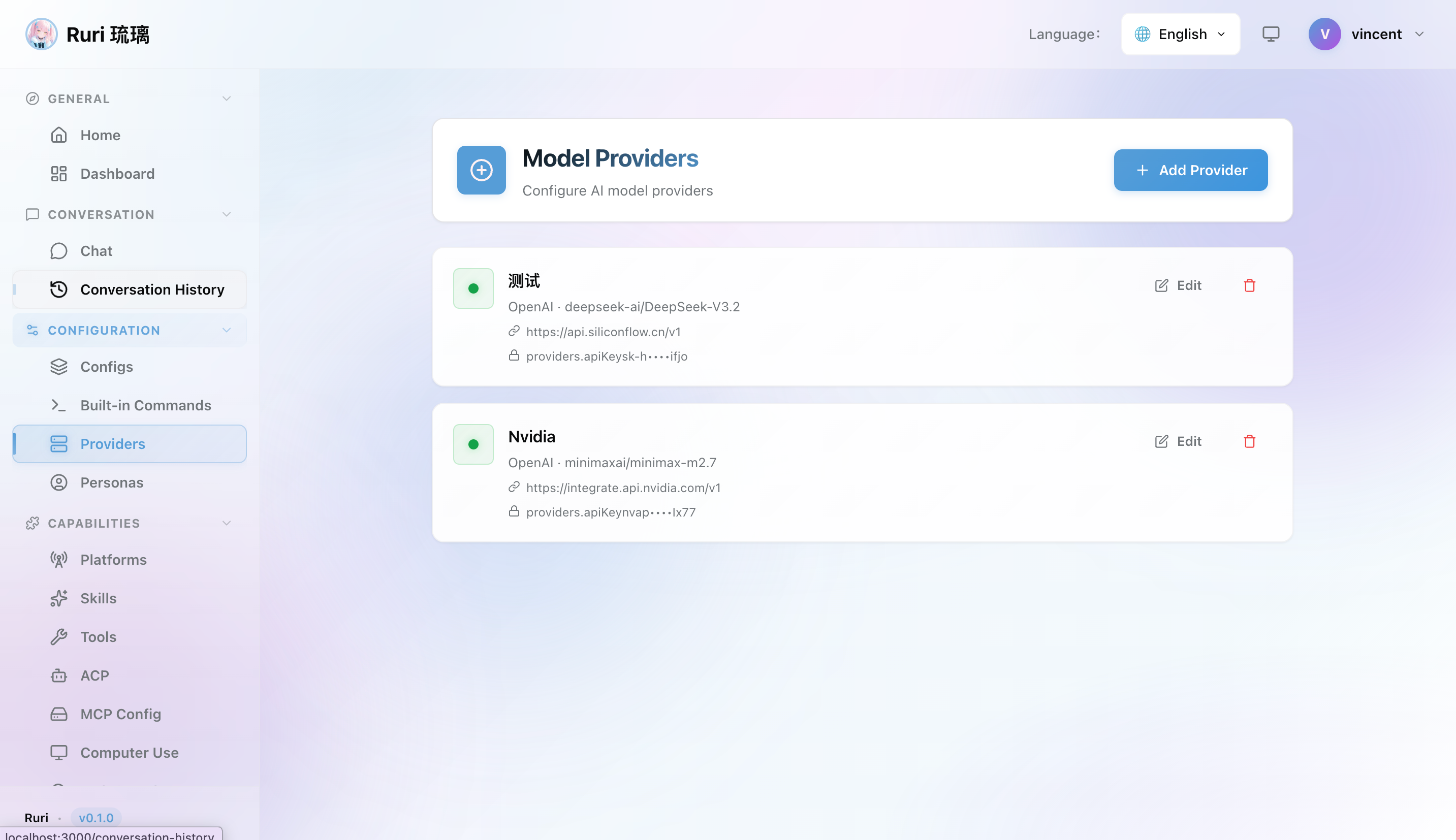
Adding a Provider
- Navigate to the Providers page in the sidebar
- Click Add Provider
- Select the provider type (OpenAI Compatible / Anthropic Compatible / Gemini Compatible)
- Fill in the name, API URL, API Key, model name, and whether it supports multimodal
- Click Save
Fetching Available Models
Ruri can automatically fetch the list of available models from your provider's API:
- Go to the Providers page
- Click the Fetch Models button on a provider
- Ruri queries the provider's API and returns all available model IDs
- Pick the model you want from the list
This works with OpenAI-compatible and Anthropic-compatible APIs, making it easy to discover models without manually looking up IDs.
Activating Providers
Only one provider can be active at a time. In the provider list, click the Activate button on the provider you want to use.
提示
If you frequently switch between providers, check out Config Profiles — you can create profiles with different providers and switch between them instantly.
Editing and Removing
In the provider list, you can edit existing provider configurations or delete providers you no longer need at any time.
Popular Provider Setup
OpenAI (GPT-4o)
- Add a provider and select OpenAI Compatible
- Fill in the following:
| Field | Value |
|---|---|
| Name | OpenAI |
| API URL | https://api.openai.com/v1 |
| API Key | Your OpenAI API key (starts with sk-) |
| Model | gpt-4o |
| Supports Multimodal | true (GPT-4o supports image inputs) |
- Save and activate
信息
Get your API key from platform.openai.com. You'll need an OpenAI account with billing enabled.
Anthropic (Claude Sonnet 4)
- Add a provider and select Anthropic Compatible
- Fill in the following:
| Field | Value |
|---|---|
| Name | Anthropic |
| API URL | https://api.anthropic.com |
| API Key | Your Anthropic API key |
| Model | claude-sonnet-4-20250514 |
| Supports Multimodal | true (Claude supports image inputs) |
- Save and activate
信息
Get your API key from console.anthropic.com.
Google Gemini
- Add a provider and select Gemini Compatible
- Fill in the following:
| Field | Value |
|---|---|
| Name | Gemini |
| API URL | https://generativelanguage.googleapis.com |
| API Key | Your Gemini API key |
| Model | gemini-2.5-flash |
| Supports Multimodal | true (Gemini natively supports image inputs) |
- Save and activate
信息
Get your API key from aistudio.google.com. Gemini offers a generous free tier — a great way to get started without paying!
Model Options
Popular Gemini models include:
gemini-2.5-flash— Fast and efficient for most tasksgemini-2.5-pro— More capable for complex reasoning
DeepSeek
- Add a provider and select OpenAI Compatible
- Fill in the following:
| Field | Value |
|---|---|
| Name | DeepSeek |
| API URL | https://api.deepseek.com/v1 |
| API Key | Your DeepSeek API key |
| Model | deepseek-chat |
| Supports Multimodal | false |
- Save and activate
信息
DeepSeek is compatible with the OpenAI API format, so choose OpenAI Compatible. Get your API key from platform.deepseek.com.
Ollama (Local, Free)
- First, install and start Ollama, then pull a model (e.g.,
ollama pull llama3) - Add a provider in Ruri and select OpenAI Compatible
- Fill in the following:
| Field | Value |
|---|---|
| Name | Ollama |
| API URL | http://localhost:11434/v1 |
| API Key | Anything (e.g., ollama) — Ollama doesn't require a real key |
| Model | The model you pulled (e.g., llama3) |
| Supports Multimodal | false (unless using a vision model like llava) |
- Save and activate
提示
Ollama runs entirely locally — no payment required and no internet connection needed. If you're not ready to purchase API services yet, start with Ollama to experience all of Ruri's features!
Multimodal Support
Some model providers support multimodal inputs — the ability to include images in your chat messages. When enabled, you can send images to the AI and it can "see" and analyze them.
How It Works
- If your provider has Supports Multimodal set to
true, the AI can receive images you paste or attach in the chat - If a model receives an image but doesn't support it, Ruri automatically falls back by stripping the image and retrying the request — no errors, just graceful degradation
- Gemini and Claude models natively support multimodal, while many OpenAI-compatible models (GPT-4o, GPT-4V) also support it
Setting Multimodal Support
When adding or editing a provider, you can toggle the Supports Multimodal option:
- On — The provider will receive image content in requests
- Off — Images are stripped before sending to the provider (useful for local models that don't support vision)
警告
If you enable multimodal for a model that doesn't support it, you may see errors. Ruri handles this gracefully by retrying without images, but it's better to set this accurately from the start.
Tips
- 💡 Try Ollama first — Free local models, perfect for experimenting and testing, no API key needed
- 🆓 Try Gemini's free tier — Google Gemini offers a generous free tier, great for starting at zero cost
- 🔄 Set up multiple providers — Add multiple providers and switch between them anytime to handle different scenarios
- 📋 Config profile linking — Bind different providers in Config Profiles to switch your entire configuration with one click
- 🔗 Proxy services — If you use an API proxy (such as a relay service), simply change the API URL to your proxy endpoint
- ✅ Check URL paths — OpenAI-compatible URLs typically end with
/v1, while Anthropic-compatible URLs do not - 🔍 Fetch models — Use the "Fetch Models" button to automatically discover available models from your provider's API